


Slim Chickens
4.62.59K Reviews
App Specs
- Version
- 4.0.3
- Updated On
- License
- Free
- Downloads
- 500,000+
- Developer
- Slim Chickens App
- Categories
- Food & Drink
- Platform
- Android, iOS
Screenshots
 Analysis by AppCompare
I tend to judge a restaurant-ordering app by what happens when I’m hungry, in a hurry, and trying not to make a mistake. Slim Chickens is aimed at people who already know they want this particular chicken restaurant and would rather sort out an order on their phone than start from scratch at the counter. In that narrow job, it can be handy; it is less useful if I’m still deciding what kind of food I want or comparing nearby restaurants.
Where ordering can feel less straightforward
The first thing I’d keep in mind is that an ordering app is only as useful as the choices it presents for the location and occasion I have in mind. Before spending time customizing a meal, I’d check that I have selected the right restaurant and that the ordering option shown suits my plan. A pickup order and a delivery order are not interchangeable: I need to know where I intend to collect the food, or where I expect it to go, before I commit.
That small check can prevent a familiar kind of frustration: carefully building an order and then discovering that I was working with the wrong location or service method. If the app’s available choices do not fit my schedule, I would not assume that repeated taps will fix it. I’d pause, review the restaurant selection, and decide whether ordering directly is still the best route for this meal.
Menu browsing also takes a little thought when I’m ordering for more than myself. A photo can help me recognize a dish, but it does not answer every practical question about what a friend or family member wants. I find it sensible to settle the basics—main items, sauces, and any changes—before placing the order, rather than relying on memory while switching between people’s preferences. That is especially useful when one person wants a simple repeat order and another wants to customize.
Simple checks before placing an order
When I use a restaurant app, I try to make the final review deliberate instead of treating the last button as a formality. I check the selected items, quantities, and customizations, then confirm the restaurant and order method. This is a practical habit for Slim Chickens because small changes such as removing an ingredient or choosing a sauce can matter more than the general item name. If I’m ordering for a group, I read the basket once from top to bottom before submitting.
I’d also make sure the app is current on my device. Slim Chickens is a free Food & Drink app from Slim Chickens App, and version 4.0.1 requires Android 8.0 or later. Those details are useful when an older phone struggles to install or update it: checking the operating-system version is a more sensible first step than repeatedly trying the same download. The app is rated for Everyone, so its age classification is not a reason an adult or family user would need to avoid it.
For rewards, I would treat the account step as something to complete calmly, rather than while standing in a queue with people waiting behind me. Slims Rewards® is part of the app’s appeal, but reward balances and the ordering process are only helpful if I can access the account I actually use. I’d check that I am signed in before expecting a purchase to be associated with my rewards activity, and I would keep any sign-in details available if I have not used the app in a while.
Worth Reading Before You Choose

EA SPORTS FC Mobile 26 Is a Bigger Football Game, but It Takes Time

Flipboard Shows What News Apps Must Do Beyond the Feed

Switching to Android Auto Means Rethinking Your Driving Routine

Google Calendar Makes a Crowded Week Easier to Manage

Ludo King Makes the Most of the Minutes Between Plans

Baby Panda World Brings Quick Play to Modern Phones, but Its Game Library Feels Busy
Recovering when a step goes wrong
If a screen takes longer than expected or an order does not seem to move forward, I avoid tapping the same control repeatedly. I first check whether the screen has changed, whether my connection is working, and whether I can still see the order details I entered. Repeating a payment or submission action without knowing what happened can create confusion, so a short pause and a careful recheck are better than rushing through the same step again.
If the app closes or I lose my place, I would reopen it and look for the current order status before starting over. The key question is whether the order was actually submitted. If the app clearly shows that it was not, rebuilding the basket may be reasonable; if I cannot tell, I would avoid creating a duplicate and use the restaurant’s normal contact route to clarify. That is not a special trick, but it is a useful way to handle any mobile order without turning a minor glitch into two meals I did not intend to buy.
Notifications can be useful when I’m collecting food, but I would not make them my only source of truth. A notification is easy to miss when my phone is muted or busy, so I’d check the order screen if I need to know where things stand. I also try to keep the app open only when I need it; there is little value in watching a screen continuously when I can use the time to get ready to leave or coordinate with the person collecting the meal.
When the problem may be outside the app
Not every delay or unavailable choice points to a software fault. The restaurant, the selected order method, the phone’s connection, and the timing of a visit can all affect what I can do. If an option disappears after I change locations, I would first confirm that the new restaurant is the one I meant to choose. If a page will not load, I’d check the connection and try again once before deciding that the app itself is broken.
There is also a limit to what an app can solve: it can make ordering more convenient, but it cannot make a restaurant fit a plan that is already too tight. When I have only a few minutes, I would check the order details and collection plan before relying on a mobile order to save time. If flexibility matters more than ordering ahead, speaking to staff in person may be the better choice, since I can ask questions directly rather than trying to resolve uncertainty through a screen.
Who will get the most from it
I think the app makes the most sense for someone who already chooses Slim Chickens often enough to know what they like, or for a first-time visitor who wants to look through the restaurant’s menu before deciding. Its strongest everyday use is reducing the back-and-forth of making a familiar order. Saving a preferred combination, when that option is available in the ordering flow, can be useful on a busy day because it reduces repeated decisions; I would still review the basket each time rather than assuming every detail is right.
Picture a lunch break when I’m leaving work and want to collect food on the way home. I can decide what everyone wants before I reach the restaurant, place the order when my plan is clear, and use the app to keep track of the order rather than trying to remember several separate requests. The benefit is not that every part of the trip becomes effortless; it is that I can do the decision-making at a more convenient moment and arrive with a clearer plan.
It is a less natural fit for someone who rarely eats at this restaurant, wants a broad comparison of local food options, or needs to discuss a complicated request before ordering. A general delivery or restaurant-discovery service may be more useful for comparing different cuisines and businesses in one place. Likewise, if I have questions that depend on a particular location or need a direct conversation, calling or ordering in person may be more dependable than guessing from the app.
How it compares with other ways to order
Compared with walking up to a counter, ordering by phone gives me more time to look over my choices and organize a group order. The trade-off is that a screen cannot replace asking a person a quick question when I am unsure about an item or a change. Compared with a broad food-delivery app, a restaurant-specific app is more focused: I’m using it because I have already chosen Slim Chickens, not because I want to browse a whole town’s options.
That focus is a strength when I am a returning customer and a limitation when I am undecided. I would not install it expecting a general meal planner or a tool for comparing restaurants. I’d use it as a direct route to ordering from this one brand, and choose another option when selection across multiple restaurants matters more than a familiar menu and rewards account.
What the rewards angle is worth
The rewards program is a reason to keep the app around if I visit regularly, but I would treat it as a bonus rather than the only reason to order. Rewards are most practical when they fit a habit I already have: I can make a normal purchase, keep track of the account I use, and see whether the program adds value over time. It makes less sense to choose a meal I did not want just to chase a possible benefit.
The app has an average rating of 4.7 from around 14,000 ratings, and it has been installed over 500,000 times. Those figures suggest that plenty of people find a use for it, but they do not tell me whether it will suit my own ordering habits. I would judge it by whether I return to the same restaurant, whether the ordering flow works for my usual plans, and whether I find the rewards convenient enough to keep using.
Getting Started with Slim Chickens
Diving into the Slim Chickens app is as satisfying as biting into a piece of their famous chicken tenders. The moment you open it, you’re greeted by a user-friendly interface that’s both sleek and straightforward. It’s like they knew I’m not a tech whiz and just want to get to the good stuff—ordering my favorite chicken dishes!
Setting up an account is a breeze. You can sign up using your email or link it to your social media accounts, which saves time and gets you straight to the menu. And trust me, the menu is where the magic happens. From mouth-watering chicken wings to juicy sandwiches, the app has it all laid out in a visually appealing way that makes choosing your meal almost too hard because everything looks so good!
Features That Make It Cluck
One of the standout features is the easy navigation. Whether you’re a first-time user or a seasoned Slim Chickens pro, finding what you need is intuitive. The categories are neatly organized, and each item comes with a drool-worthy photo and a detailed description. It's like having a digital menu that you can actually taste with your eyes.
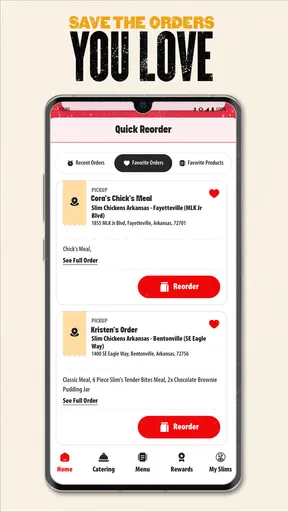
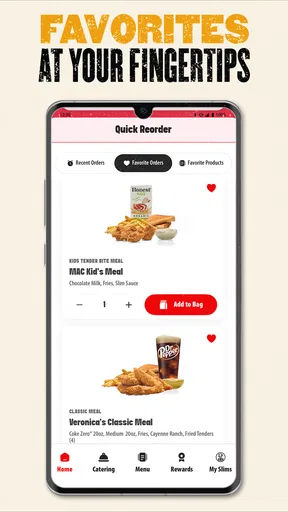
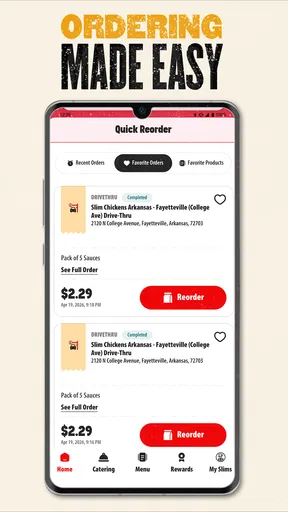
And let’s talk about customization. The app lets you tweak your orders just the way you like them. Want extra sauce or no pickles? No problem. It’s like having a personal chef who listens to your every craving. Plus, you can save your favorite orders, which is super handy for those days when you’re too hungry to think.
Satisfying the Craving
Once you’ve placed your order, the app keeps you updated with real-time notifications. You’ll know exactly when your order is being prepared, when it’s ready for pick-up, and even when it’s out for delivery if you choose that option. It’s like a little countdown to chicken heaven!
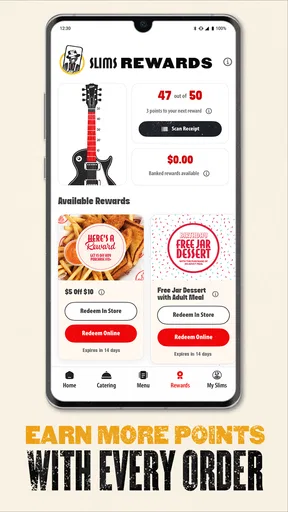
And if you’re someone who loves rewards, you’re in luck. The app has a built-in loyalty program that lets you earn points with every purchase. These points can be redeemed for discounts or free items, which is a sweet deal for anyone who plans on making Slim Chickens their go-to spot for chicken cravings.
A practical final take
Overall, I see this as a useful companion for ordering from a restaurant I already want to visit, not a reason to change my eating habits. It puts menu browsing, order customization, and rewards in one place, which suits repeat customers and people coordinating a straightforward pickup or delivery. I’d skip it if I mainly need to compare restaurants, ask detailed questions before ordering, or prefer handling every decision face to face.
My best advice is to confirm the location and order method early, review the basket carefully, and check the order status rather than relying only on a notification. With those small habits, the app can make a familiar meal easier to organize. The current version is 4.0.1, and the app is free, so it is easy to try if Slim Chickens is already part of your routine. For me, its value comes down to convenience: when I know what I want from this restaurant, it gives me a more organized way to get it.
Pros
- User-friendly interface for easy navigation.
- Extensive menu with diverse chicken options.
- Loyalty program offers great rewards.
- Efficient online ordering and payment system.
- Regular updates improve app functionality.
Cons
- Limited customization options for orders.
- Notifications can be overly frequent.
- Occasional slow loading times.
- Requires stable internet for full functionality.
- Not available in all regions.
FAQs for Slim Chickens
What is Slim Chickens and what features does it offer?
Slim Chickens is a user-friendly app that allows customers to browse the menu, place orders for pickup or delivery, and earn rewards. The app features an intuitive interface with access to exclusive offers, nutritional information, and location services to find the nearest Slim Chickens restaurant.
How does the rewards program work within the Slim Chickens app?
The Slim Chickens app includes a rewards program where users can earn points on every purchase. Accumulated points can be redeemed for discounts or free menu items. The app also provides personalized offers and promotions based on user preferences, enhancing the dining experience.
Is the Slim Chickens app available for both Android and iOS devices?
Yes, the Slim Chickens app is available for download on both Android and iOS platforms. Users can find it on the Google Play Store for Android devices and the Apple App Store for iOS devices, ensuring broad accessibility across different smartphones and tablets.
Are there any special promotions or discounts available through the app?
The Slim Chickens app regularly features exclusive promotions and discounts for its users. By enabling notifications, customers can stay up-to-date with the latest deals and limited-time offers, ensuring they never miss out on a chance to save on their favorite meals.
How secure is the payment process in the Slim Chickens app?
The Slim Chickens app employs robust security measures to ensure safe transactions. It uses encryption and secure payment gateways to protect user data. Additionally, users can choose from various payment methods, including credit/debit cards and digital wallets, for convenience and peace of mind.


